Pay With Cash in the MyLTE Wireless App
LTE Wireless makes it easy to pay with cash through our secure partnership with Paysafe. Whether you don’t have a credit or debit card or simply prefer to pay with cash, this flexible option lets you complete your purchase through the MyLTE Wireless app and pay at one of 60,000+ retail locations nationwide, including CVS, Walgreens, 7-Eleven, and more.
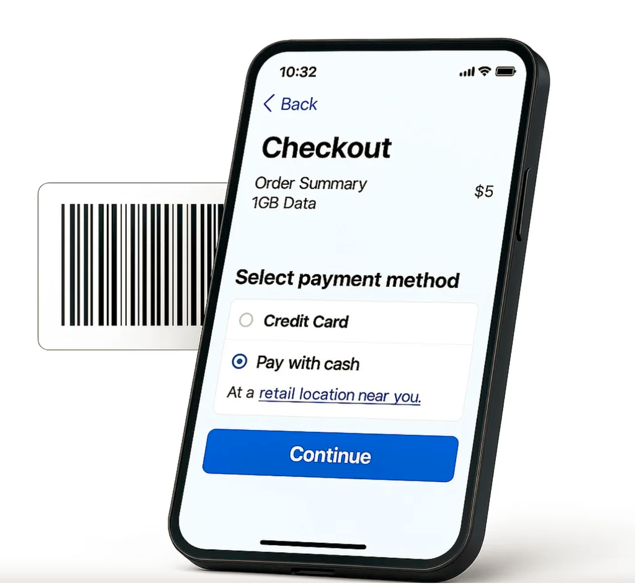
There’s no need for a bank account, credit or debit card, or mobile wallet. Just choose “Pay With Cash”, save your barcode, and complete your payment at a participating store.
How It Works
Paying with cash is fast, secure, and easy. Here’s how it works:
1
Tap “Pay with Cash”
In the MyLTE Wireless app, select “Pay with Cash” as your payment method when checking out for eligible purchases or services. This option is available for transactions over $5.
1
Save Your Barcode
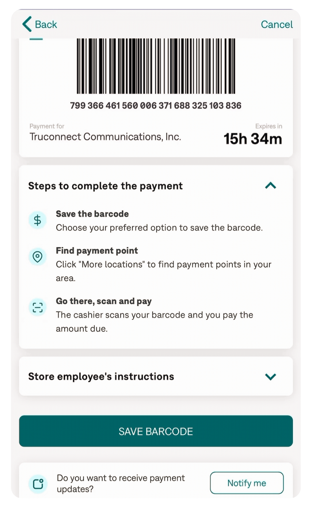
You’ll be redirected to Paysafe’s secure site, where your barcode will appear. Tap “Save Barcode” and choose how you’d like to save it: SMS, Email, or Printable PDF.
1
Visit a Nearby Store
Find a participating retailer near you (e.g., CVS, Walgreens, 7-Eleven, Walmart). Bring your barcode to the store within 24 hours to complete your cash payment.
1
Scan, Pay, Confirm
Show your barcode to the cashier and let them know you’re making a PaysafeCash payment. You’ll receive a printed receipt in-store and a confirmation once your payment is complete.
NOTE
Barcodes are single-use and expire after 24 hours. If needed, you can generate a new barcode in the MyLTE Wireless app.
Barcodes are single-use and expire after 24 hours. If needed, you can generate a new barcode in the MyLTE Wireless app.
How to Save Your Barcode
Before heading to the store, be sure to tap “Save Barcode” and select the option that works best for you.
We recommend “Send as SMS” or “Send to Email” for easy access later. These options include a direct link back to your barcode page.
If you choose “Send to Email”, you may also be automatically signed up to receive helpful payment updates, including confirmation when your payment is complete.
If you save your barcode via text or email, look out for messages from:
✆+1 (833) 318-0584
✉notifications@paysafecash.com
What You’ll Need
✓ A valid Paysafe barcode generated in the MyLTE Wireless app
✓ The full cash amount for your purchase
✓ Access to a participating retailer that accepts PaysafeCash payments
Popular participating stores include:
Ready to pay with cash? Download the MyLTE Wireless app to get started.
Skip the cards and pay on your terms. With the MyLTE Wireless app, you can pay with cash at over 60,000 stores nationwide.
Download the app to get started. Because staying connected shouldn’t depend on how you pay.
Download the app to get started. Because staying connected shouldn’t depend on how you pay.